編輯器
2016年5月18日 星期三

Maven-在 Eclipse 創立 Maven 專案_執行 Jar ( 三 )
上一篇 : Maven-在 Eclipse 創立 Maven 專案_Hello Maven( 二 )
用 Maven build 生成的 Jar 我們執行看看會發生什麼事情?
在我們剛剛訊息列裡面
1 . 生成的 Jar 擺放位置

2 . 不想看的結果
原因 : 因為無法辨別主要的進入點

3 . 我們在專案內的 pom 新增
4 . 我們再重新建立

5 . 重新執行

參考資料 : Eclipse Blue, Maven: Project configuration is not up-to-date with pom.xml
歡迎轉載,請註明出處。
用 Maven build 生成的 Jar 我們執行看看會發生什麼事情?
在我們剛剛訊息列裡面
1 . 生成的 Jar 擺放位置

2 . 不想看的結果
原因 : 因為無法辨別主要的進入點

3 . 我們在專案內的 pom 新增
<build>
    <plugins>

        <!-- environment problem -->
        <plugin>
            <artifactId>maven-compiler-plugin</artifactId>
            <version>3.1</version>
            <configuration>
                <fork>true</fork>
                <executable>C:\JAVA\jdk\bin\javac.exe</executable>
            </configuration>
        </plugin>

        <!--
        打包成 Jar 檔案
        目的 :
        必須給進入點,否則執行會出現
        XXX.jar 中沒有主要資訊清單屬性
          -->
        <plugin>
            <groupId>org.apache.maven.plugins</groupId>
            <artifactId>maven-jar-plugin</artifactId>
            <version>2.3.1</version>
            <configuration>
                <archive>
                    <manifest>
                        <mainClass>first.Hello</mainClass>
                        <packageName>first</packageName>
                    </manifest>
                    <manifestEntries>
                        <mode>development</mode>
                        <url>${pom.url}</url>
                    </manifestEntries>
                </archive>
            </configuration>
        </plugin>

    </plugins>
</build>
4 . 我們再重新建立

5 . 重新執行

參考資料 : Eclipse Blue, Maven: Project configuration is not up-to-date with pom.xml
歡迎轉載,請註明出處。
Maven-在 Eclipse 創立 Maven 專案_Hello Maven( 二 )
上一章 : Maven-在 Eclipse 創立 Maven 專案_環境安裝( 一 )
開始執行程式
1 . 創立 Maven 專案
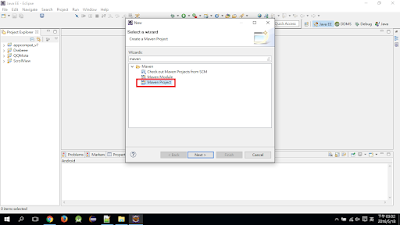
2 . 選擇專案樣板

3 . 輸入專案相關資料

4 . 專案創立後雖然長很多子項目,但結果如黃框

5 . 建立檔案夾目錄

6 . 建立 Main Class

7 . 測試結果可執行

8 . 使用 Maven build

9 . 建立

10 . Build maven error

解法
1 . 更新當前的 Jre
2 . 在 Maven 專案內的 pom 新增plugin
( work for me )

11 . 再次執行

參考資料 : Maven 教學-HelloMaven 第一個Maven專案 (Step by Step ~)
歡迎轉載,請註明出處。
開始執行程式
1 . 創立 Maven 專案

2 . 選擇專案樣板

3 . 輸入專案相關資料

4 . 專案創立後雖然長很多子項目,但結果如黃框

5 . 建立檔案夾目錄

6 . 建立 Main Class

7 . 測試結果可執行

8 . 使用 Maven build

9 . 建立

10 . Build maven error
[ERROR] Failed to execute goal org.apache.maven.plugins:maven-compiler-plugin:3.1:compile (default-compile) on project Brian: Compilation failure
[ERROR] No compiler is provided in this environment. Perhaps you are running on a JRE rather than a JDK?
[ERROR] -> [Help 1]
[ERROR]
[ERROR] To see the full stack trace of the errors, re-run Maven with the -e switch.
[ERROR] Re-run Maven using the -X switch to enable full debug logging.
[ERROR]
[ERROR] For more information about the errors and possible solutions, please read the following articles:
[ERROR] [Help 1] http://cwiki.apache.org/confluence/display/MAVEN/MojoFailureException

解法
1 . 更新當前的 Jre
2 . 在 Maven 專案內的 pom 新增plugin
( work for me )
</project ...>

    .
    .
    .

    <build>
        <plugins>
            <plugin>
                <artifactId>maven-compiler-plugin</artifactId>
                <version>3.1</version>
                <configuration>
                    <fork>true</fork>
                    <executable>C:\JAVA\jdk\bin\javac.exe</executable>
                </configuration>
            </plugin>
        </plugins>
    </build>
</project>

11 . 再次執行

參考資料 : Maven 教學-HelloMaven 第一個Maven專案 (Step by Step ~)
歡迎轉載,請註明出處。
Maven-在 Eclipse 創立 Maven 專案_環境安裝( 一 )
Maven 版本控管的的好處眾所皆知
但我們如何從無到有?
以下初始安裝教學
1 . 首先下載最新的 Maven


2 . 存放指定位置( 後續環境變數 與 IDE 都要此路徑 )
此路徑檔案已改全大寫( 請見下圖 )

3 . 設置環境變數 :
MAVEN_HOME 複製以上檔案路徑

Path : %MAVEN_HOME%\bin

4 . 再命令提示字元,確認環境變數設置是否正確
mvn -version

歡迎轉載,請註明出處。
但我們如何從無到有?
以下初始安裝教學
1 . 首先下載最新的 Maven


2 . 存放指定位置( 後續環境變數 與 IDE 都要此路徑 )
此路徑檔案已改全大寫( 請見下圖 )

3 . 設置環境變數 :
MAVEN_HOME 複製以上檔案路徑

Path : %MAVEN_HOME%\bin

4 . 再命令提示字元,確認環境變數設置是否正確
mvn -version

歡迎轉載,請註明出處。
2016年5月14日 星期六
2016年5月12日 星期四
Android-SQLite 使用(一)
趁最近有機會
可以有接觸 SQLite
就把小簡易程式碼放此
並且實案教學
1 . 為什麼要用 DB 存取
2 . 有需要存哪些資料
3 . 要有啥功能
....等,如有需要補充
請至下方留言
簡易專案:
名稱:筆記本
用途:使用者紀錄每天備忘錄
1 . 建立資料庫
2 . 新增資料
3 . 修改資料
4 . 刪除資料
5 . 查詢資料
參考資料 : Android高效入門—SQLite資料庫
參考資料:How to store data locally in an Android app
參考資料:How do I view the SQLite database on an Android device? [duplicate]
可以有接觸 SQLite
就把小簡易程式碼放此
並且實案教學
1 . 為什麼要用 DB 存取
2 . 有需要存哪些資料
3 . 要有啥功能
....等,如有需要補充
請至下方留言
簡易專案:
名稱:筆記本
用途:使用者紀錄每天備忘錄
1 . 建立資料庫
create table counter (
  id INTEGER PRIMARY KEY   AUTOINCREMENT,
  count_date TimeStamp UNIQUE  NOT NULL,
  count_number int,
  count_note char(255)
);
2 . 新增資料
insert into counter (count_date, count_number, count_note)
      values (Date(), 20, "1_1");
3 . 修改資料
update counter set count_number = 40, count_note = "1_2"
      where count_date = Date();
4 . 刪除資料
delete from counter where count_date = Date();
5 . 查詢資料
select * from counter;
select * from counter order by count_date ASC;  小到大
select * from counter order by count_date DESC; 大到小
select count_number from counter where count_date = "2017-12-30";
參考資料 : Android高效入門—SQLite資料庫
參考資料:How to store data locally in an Android app
參考資料:How do I view the SQLite database on an Android device? [duplicate]
訂閱:
文章 (Atom)